Building My Homelab: From Dream to Reality
From HomeServer to a HomeLab
Having a HomeLab was something I never knew I would ever have. Honestly, it is a deep rabbit hole, and unfortunately (or maybe fortunately ;D), I fell down into ever evolving hobby.
My HomeLab started like a tinkerer's experiment and has now turned into a full fledged setup running services for my family. It consists of applications running across multiple sites. Here's my setup
Architecture Overview
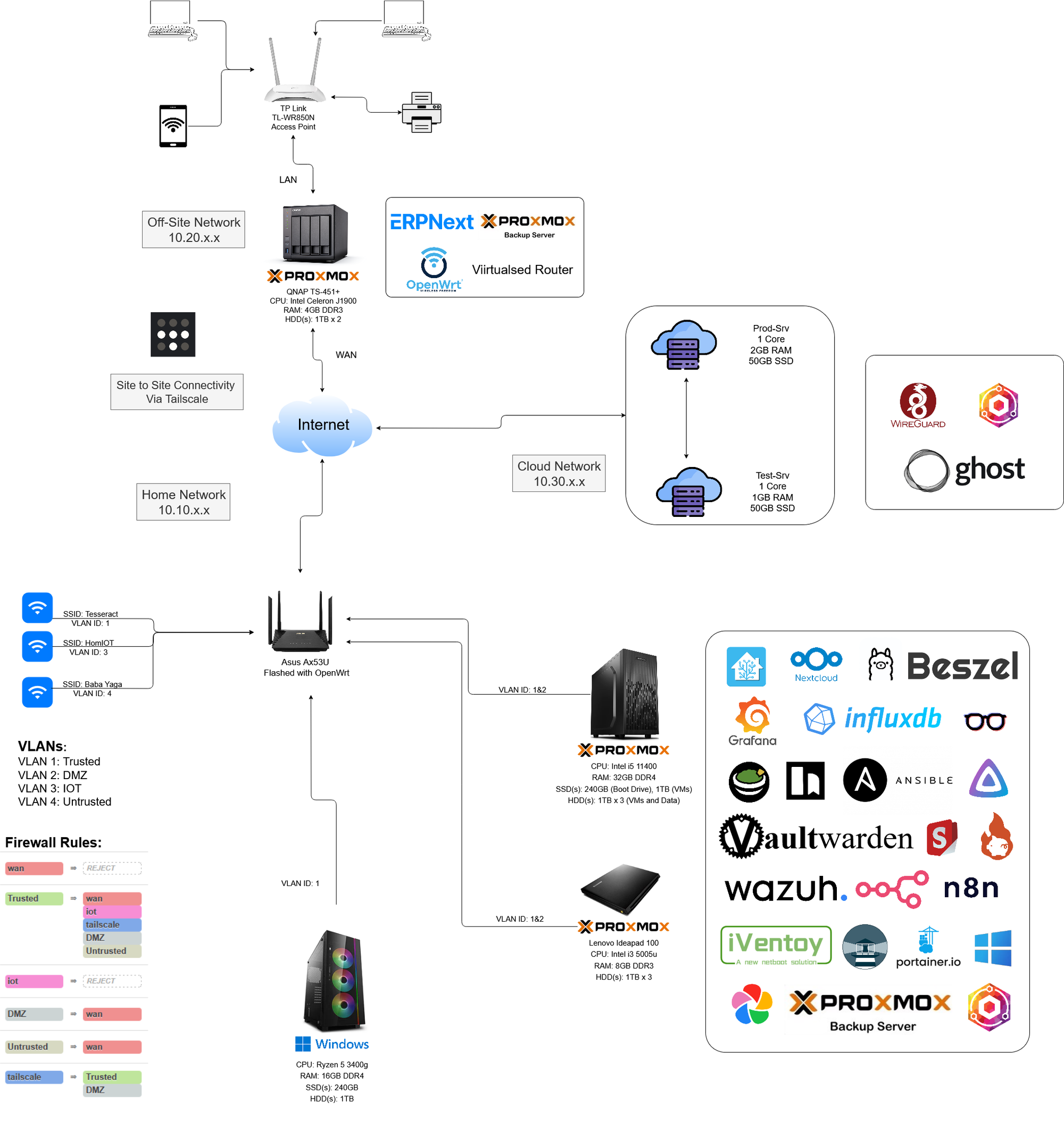
At high level, my setup consists of three main environments:
- Home Network (10.10.x.x)
- Offsite/Store Network (10.20.x.x)
- Cloud Network (10.30.x.x)
I have connected these sites through Tailscale, allowing me for site-to-site connectivity while VLANs and firewall rules keep things neatly separated and safe.
Home Network (10.10.x.x)
- Router: Asus AX53U running OpenWRT
- Hosts VLANs for segmentation with dedicated SSIDs (Trusted, DMZ, IoT, Untrusted).
- Allows site-to-site connectivity through Tailscale
- Enforces Firewall Rules
- Artemis (Tower Server):
- Hardware: Intel i5 11400 (6c 12T), 32GB RAM, 1x240GB SSD (Boot), 1x1TB SSD (VMs), 2 x 1TB HDDs, 2x1Gbe NICs
- Runs Proxmox VE with multiple VMs:
- Proxmox Backup Server(PBS)
- Ollama for AI
- Nginx Proxy Manager for reverse proxy
- Wazuh for SIEM + XDR
- Atom (Laptop Server):
- Hardware: Lenovo IdeaPad 100 Intel i3 5005u (2c 4t), 8GB RAM, 1x1TB HDD
- Runs Proxmox VE for light weight resources:
- Grafana + InfluxDB for monitoring
- Ansible & n8n for automation
- Home Assistance for Home Automation
Offsite / Store Network (10.20.x.x)
- Qnap TS451
- Hardware: Intel J1900(4c 4t), 4GB RAM, 2x 1TB HDDs, 2x 1Gbe NICs
- Runs Proxmox VE with these VMs:
- Virtualized Router with OpenWRT which allows site-to-site connectivity, VLANs, and replaces need of physical router
- ERPNext for business needs
- Backup Target with Proxmox Backup Server for offsite backups
With this server, I am able to backup my data offsite for 3-2-1 backup, and simultaneously access my other machines connected to the offsite network remotely.
Cloud Network (10.30.x.x)
- Hosted on Oracle Cloud
- Production Server: 1 vCPU, 2 GB RAM, 50 GB SSD
- Test Server: 1 vCPU, 1 GB RAM, 50 GB SSD
- Key Services:
- Nginx Proxy Manager for reverse proxy and SSL.
- Ghost Blog (this site).
- WireGuard for VPN access.
Closing Thoughts
This evergrowing (and never ending :p) HomeLab has just been everything to me. While it acts like a play ground, it also hosts important services that me and my family rely on everyday. I've learnt so much about Linux, Networking, Security and countless other areas, that I probably wouldn't have ever explored.
I am glad I started this journey. If you're intrested to start your own homelab, or want to learn more about mine, feel free to reach out :)
Peace ✌️